Drive
Drive is your central hub for managing documents, enabling team collaboration, and organizing content for your AI agents.
Overview
The Drive provides a comprehensive file management system where you can organize, share, and manage documents that agents can draw on via RAG.
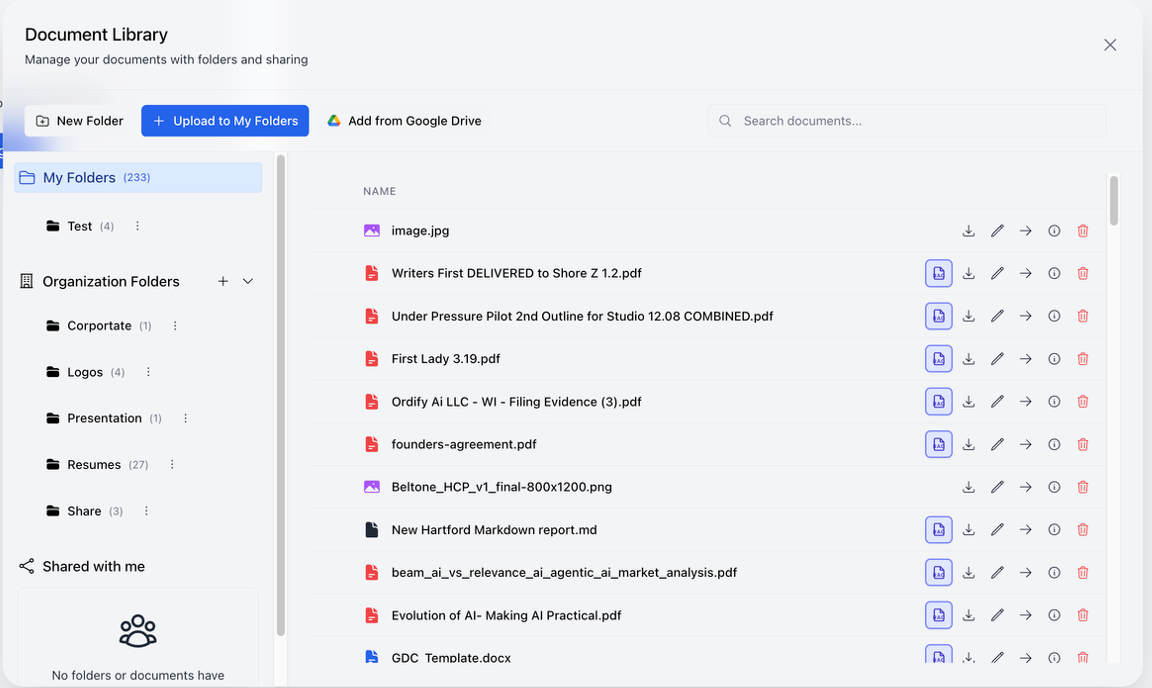
File organization
The Drive uses a folder-based organization system:
- My Folders: Your personal document collection, organized in folders you create
- Organization Folders: Shared folders accessible across your entire organization
- Shared with me: Documents and folders that others have shared with you
Connecting documents to agents (RAG)
To learn how to turn documents into a knowledge base for your agents using Retrieval Augmented Generation — including syncing entire folders automatically — see RAG setup.
Adding documents
Upload from your computer
- Click the "+ Upload to My Folders" button
- Select files from your computer
- Files are automatically added to your personal folders
Add from Google Drive
- Click the "Add from Google Drive" button
- Authenticate with your Google account
- Select documents from your Google Drive
- Documents are imported into your Drive
Sharing and collaboration
Ordify is designed for team interaction with AI, where inputs and outputs can be shared across your organization.
Sharing folders
- Organization Folders: Create folders that are automatically accessible to all organization members
- Team Collaboration: Multiple team members can access and contribute to shared folders
- Centralized Knowledge: Build a shared knowledge base that all team members and agents can access
Sharing files
- Individual Files: Share specific documents with team members
- Bulk Sharing: Share entire folders with your organization
- Access Control: Control who can view, edit, or manage shared documents
Team AI interaction
- Shared Context: When team members use AI agents, they can leverage the same shared documents
- Consistent Knowledge: All agents across your organization can access the same organizational knowledge
- Collaborative Inputs: Team members can contribute documents that enhance everyone's AI interactions
- Shared Outputs: AI-generated content can be saved back to shared folders for team access
Best practices
- Organize by purpose: Create folders for different departments, projects, or knowledge areas
- Use Organization Folders: Leverage organization-level folders for company-wide knowledge
- Share strategically: Share documents with team members who need access, maintaining appropriate access controls